Fenly vs tl;dv: which one to pick in 2026?
If you're comparing these two tools, you've probably lived this: the meeting ends, a polished summary lands in your inbox, and three days later you realize a commitment made in that call slipped through. Recording and transcribing stopped being the problem. The problem is what happens next.
This comparison is written by the Fenly team. We'll be direct about where tl;dv beats us, because faking neutrality would insult your intelligence. Our commitment here is to verifiable, dated facts, so you decide based on your work, not our marketing.
tl;dv is one of the best meeting recorders around: unlimited recording and transcription, 30+ languages and coaching features for sales teams. Fenly records meetings too, but solves a different problem: it turns meetings, emails, chats and WhatsApp into a daily briefing, separates your own commitments from colleagues' follow-ups, turns them into structured tasks, and keeps a queryable memory of everything that happened in your work.
- You run a sales team and need coaching on the calls: playbooks, scorecards and objection analysis
- Your priority is a shared recording library, with clips and reels for the team
- You need transcription in 30+ languages for a global team
- Your flow is CRM-centric: auto-filling HubSpot or Salesforce after every call
- Your day is made of meetings, emails, chats and WhatsApp, and you need one view of what matters: a daily briefing
- You want AI to separate your commitment from a follow-up and turn it into a structured task, with due date, priority and subtasks
- You want to ask your memory: “what did we agree with client X?”
- You want an omnichannel timeline per person: everything that happened with each contact, in one place
- You work in Portuguese, English or Spanish and want a product built for Brazil, compliant with LGPD (Brazilian data protection law)
What each tool does well
What tl;dv does well
Around since 2020, used by more than 2 million people. A mature product at what it sets out to do.
What Fenly does well
It starts from a different premise: the meeting is one of your work's channels, not its center.
Fenly vs tl;dv: side by side
Data verified in July 2026. tl;dv prices are in US dollars, converted to Brazilian reais.
| Capability | Fenly | tl;dv |
|---|---|---|
| Meeting recording | Native on the Start and Pro plans, with a monthly meeting limit per plan | Unlimited on all plans, with a 3h limit per recording |
| Transcription and summary | Yes, in Portuguese, English and Spanish | Yes, among the 30+ languages supported |
| AI summary | Included on every meeting in the paid plans | Free limited to ~10 summaries; unlimited from Pro |
| Commitment extraction | Separates your own commitments from colleagues' follow-upsFenly advantage | Action items in a single list, without telling apart who owns them |
| Task management | Structured: due date, priority, subtasks, grouping by project/epicFenly advantage | Not offered |
| Daily briefing | Yes: email + meetings + chats + WhatsApp every morningFenly advantage | Not offered; reports cover meetings only |
| People view | Omnichannel timeline per contactFenly advantage | Not offered |
| Queryable memory | Ask across every connected sourceFenly advantage | Not offered |
| Day planner | Fed by your commitments, with quick themes at the start of the dayFenly advantage | Not offered |
| Focus mode / Pomodoro | Yes, built into the plannerFenly advantage | Not offered |
| Sales coaching | Not offered | Yes: playbooks, scorecards and objections (Business) |
| Multi-meeting insights for teams | Partial: memory answers questions across several meetings (and other sources), but without team analytics reports | Yes, with scheduled reports for managers |
| Fenly | tl;dv | |
|---|---|---|
| Free plan | 7-day trial with full access, no card | Permanent free tier: unlimited recording, limited summaries, recordings deleted after 3 months |
| Entry plan | Start: R$ 79/mo, 20 recorded meetings/mo | Pro: R$ 187/mo |
| Full plan | Pro: R$ 149/mo, 50 recorded meetings/mo | Business: R$ 249/mo |
| Currency and billing | Billed in Brazilian reais | Billed in US dollars |
| Fenly | tl;dv | |
|---|---|---|
| Onboarding | Connect your inbox and get your first briefing the next day | Install the extension or app and record your first meeting in minutes |
| Card required to try | No | No |
| Learning curve | Low: the briefing comes to you, no need to open the app to get value | Low to record; medium for reports and coaching |
| Fenly | tl;dv | |
|---|---|---|
| Meeting platforms | Meet, Zoom, Teams | Meet, Zoom, Teams |
| Yes, integrates with Gmail and Outlook | Doesn't capture email as a source | |
| WhatsApp and chats | Integrated with WhatsApp as a source of memory and commitments | Sends summaries to Slack; doesn't read your chats |
| CRM | Not offered today | HubSpot, Salesforce, Pipedrive and others (from Pro) |
| Automation | Not offered today | Zapier with thousands of apps (from Pro) |
| Fenly | tl;dv | |
|---|---|---|
| Regulation | LGPD (Brazilian data protection law), Brazilian company | GDPR, SOC 2, data hosted in the European Union |
| Uses your data to train AI | No | No, publicly stated |
| Support language | Portuguese, English and Spanish | English (platform localized in 7 languages) |
In raw recording volume, CRM integrations and features for sales teams, tl;dv wins. In the layer that comes after the meeting — briefing, separating commitments, structured tasks, queryable memory and the context of people — tl;dv simply doesn't play: it's not their product.
The 6 differences that matter
Generic action items vs separated commitments and follow-ups
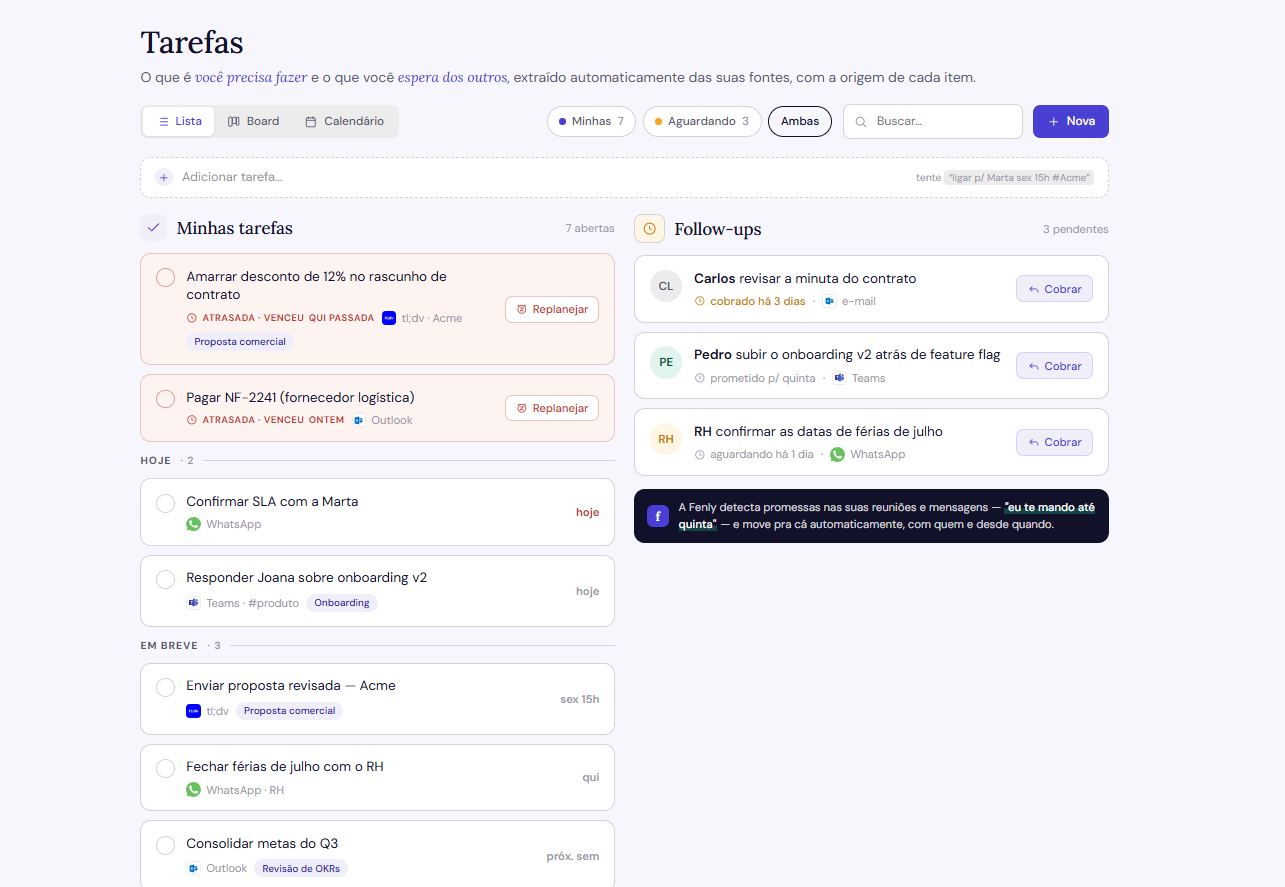
Tools like tl;dv assume a list of “action items” solves the problem. In practice, it mixes everything: what you promised, what your colleague promised, what stayed vague. Fenly treats commitment and follow-up as different things, because they are — and makes that split automatically, in every meeting. For anyone in Customer Success, that distinction is the difference between looking organized and being organized.
A summary bullet vs a structured task
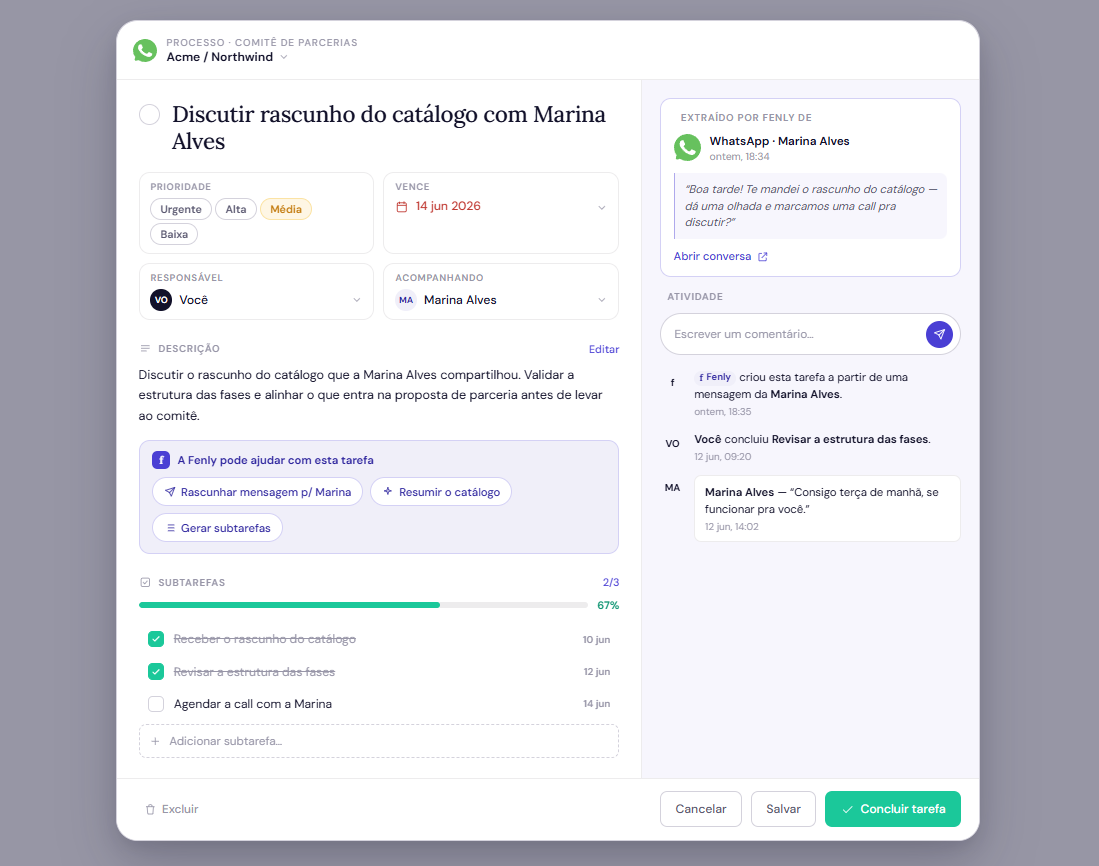
A bullet at the end of the summary isn't a task. In Fenly, the commitment becomes a real task: description, priority, due date, subtasks, grouped by project or epic. You drag, prioritize, turn on focus mode with Pomodoro and execute. It's the difference between a tool that documents your work and one that helps you do it.
A recording library vs a daily briefing
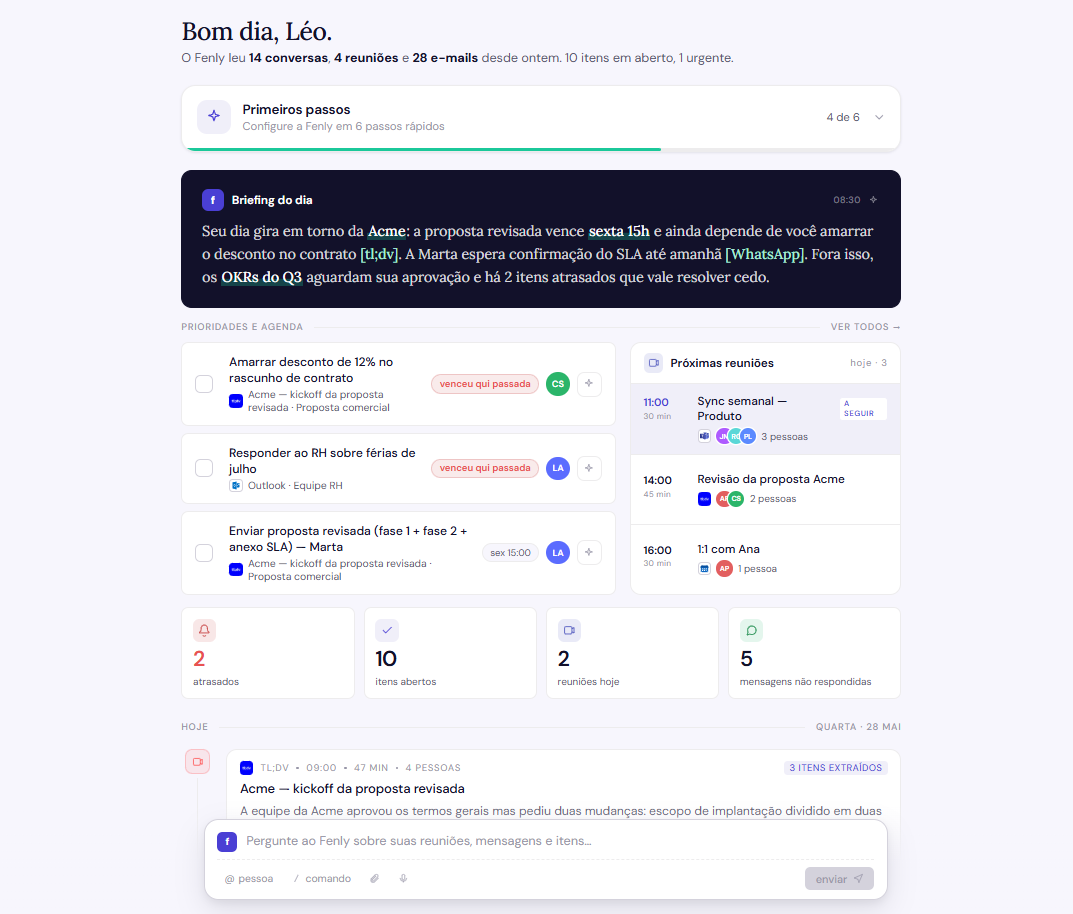
tl;dv builds a library: useful, but it requires you to go to it, and it doesn't answer the most basic question of the day — “what do I need to know right now?”. Fenly flips the direction: every morning, a briefing comes to you, consolidating email, meetings, chats and WhatsApp since yesterday. That's 2 minutes of reading before the first call, instead of 20 minutes opening tabs.
A CRM contact vs a person with history
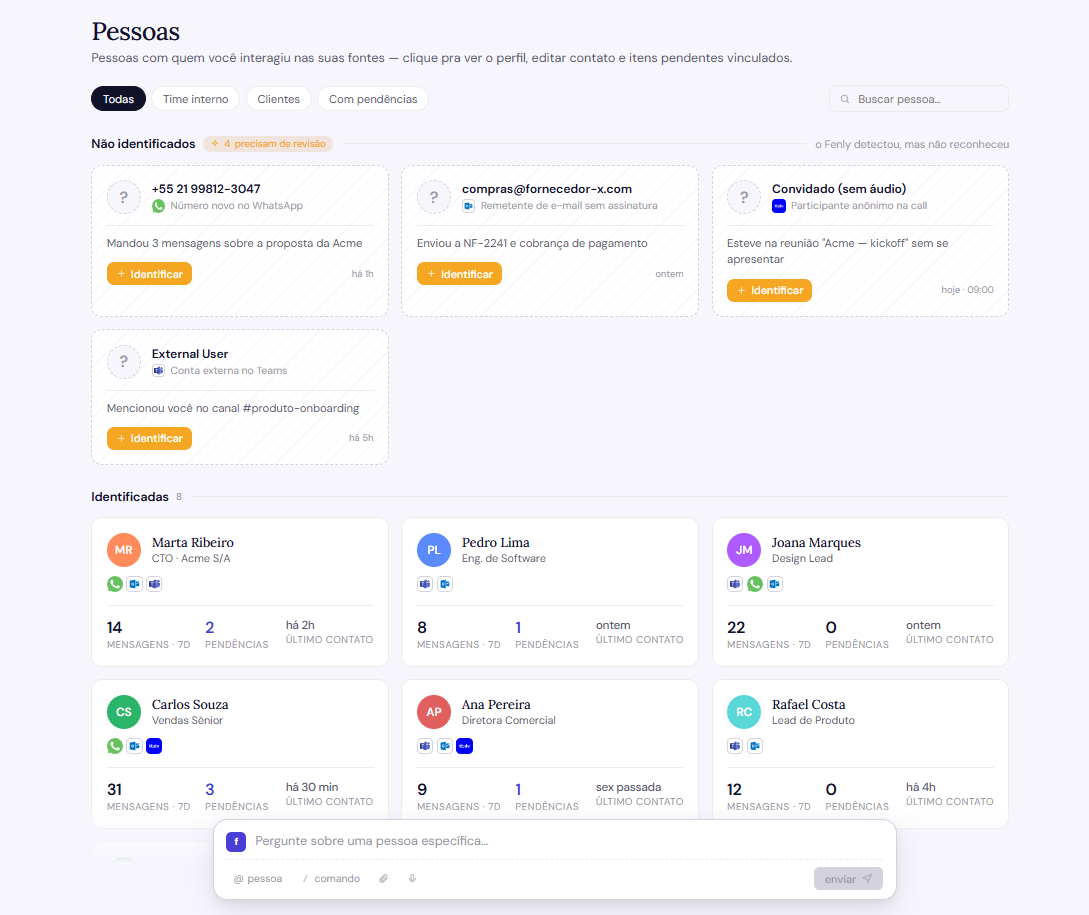
A CRM contact is a static record. In Fenly, each person has an omnichannel timeline: everything that happened with them across email, meeting, chat and WhatsApp, in one place. You walk into the call knowing exactly where you left off with that person, without reopening five histories.
Searching the transcript vs asking your memory
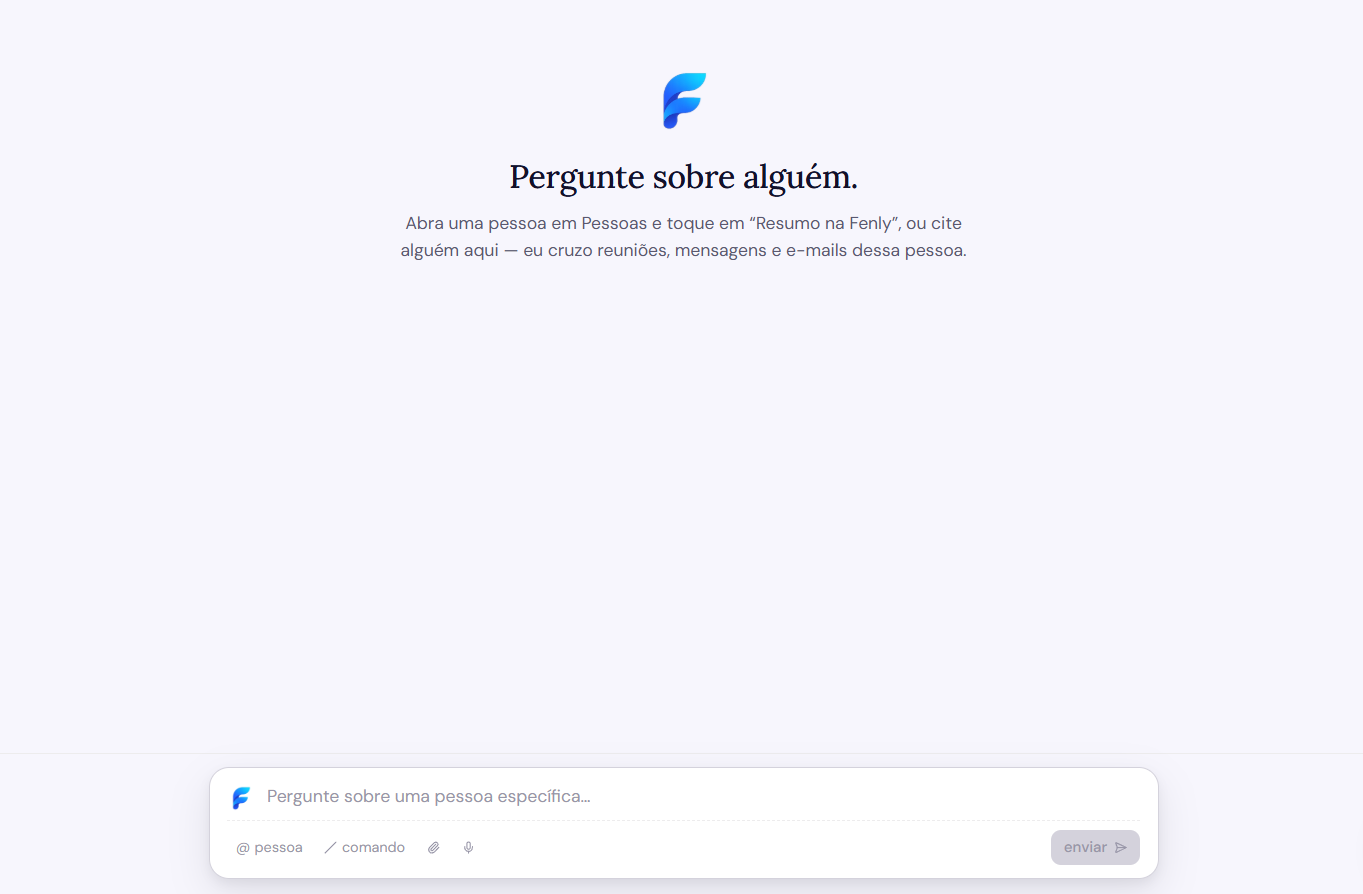
Searching a word in a transcript assumes you remember which meeting it was said in. Fenly's memory answers directly, across every connected source: “what did we agree with client X?” — and brings the answer with its source, so you can trust it without re-reading everything.
The meeting as an end vs the meeting as a channel
This is the philosophy difference that ties all the others together. For tl;dv, the meeting is the product: everything starts and ends there. For Fenly, the meeting is one of the channels where your work happens, alongside email, chats and WhatsApp — and a decision made over email counts as much as one made on a call. If your work is 90% sales calls, tl;dv's model serves you well. If your day is fragmented across channels, consolidating is what solves it.
What each one costs
| Plan | Fenly | tl;dv |
|---|---|---|
| Free / Trial | 7 full days, no card | Permanent free tier with limits: ~10 AI summaries, recordings deleted after 3 months |
| Mid tier | Start: R$ 79/mo · 20 recorded meetings/mo | Pro: R$ 187/mo |
| Full | Pro: R$ 149/mo · 50 recorded meetings/mo | Business: R$ 249/mo |
*tl;dv prices verified in July 2026 on their official site and public sources; the company runs annual-discount promotions that can change the numbers. Always check their pricing page before deciding.
Run Fenly next to tl;dv, without canceling anything
You don't have to choose in the dark. You can run both in parallel for a week.
Takes 2 minutes, no card. Your first briefing arrives tomorrow morning.
Compare the result: commitments and follow-ups separated, becoming tasks with due date and priority, not a loose list.
E.g.: “what did we agree with client X this week?” — and see the answer with its source.
If tl;dv still makes more sense for your case, no hard feelings: it's a great product at what it sets out to do. Start my 7-day trial →
Frequently asked questions about Fenly and tl;dv
Is Fenly a good tl;dv alternative?
What does tl;dv do better than Fenly?
Does Fenly record meetings like tl;dv?
Does Fenly remember what happened in my work?
How much do Fenly and tl;dv differ in price?
Does Fenly work in Portuguese?
Who is Fenly best suited for?
Can I use Fenly and tl;dv at the same time?
See your first briefing tomorrow morning
Connect your inbox in 2 minutes. No card, no commitment, 7 full days.
Try Fenly free