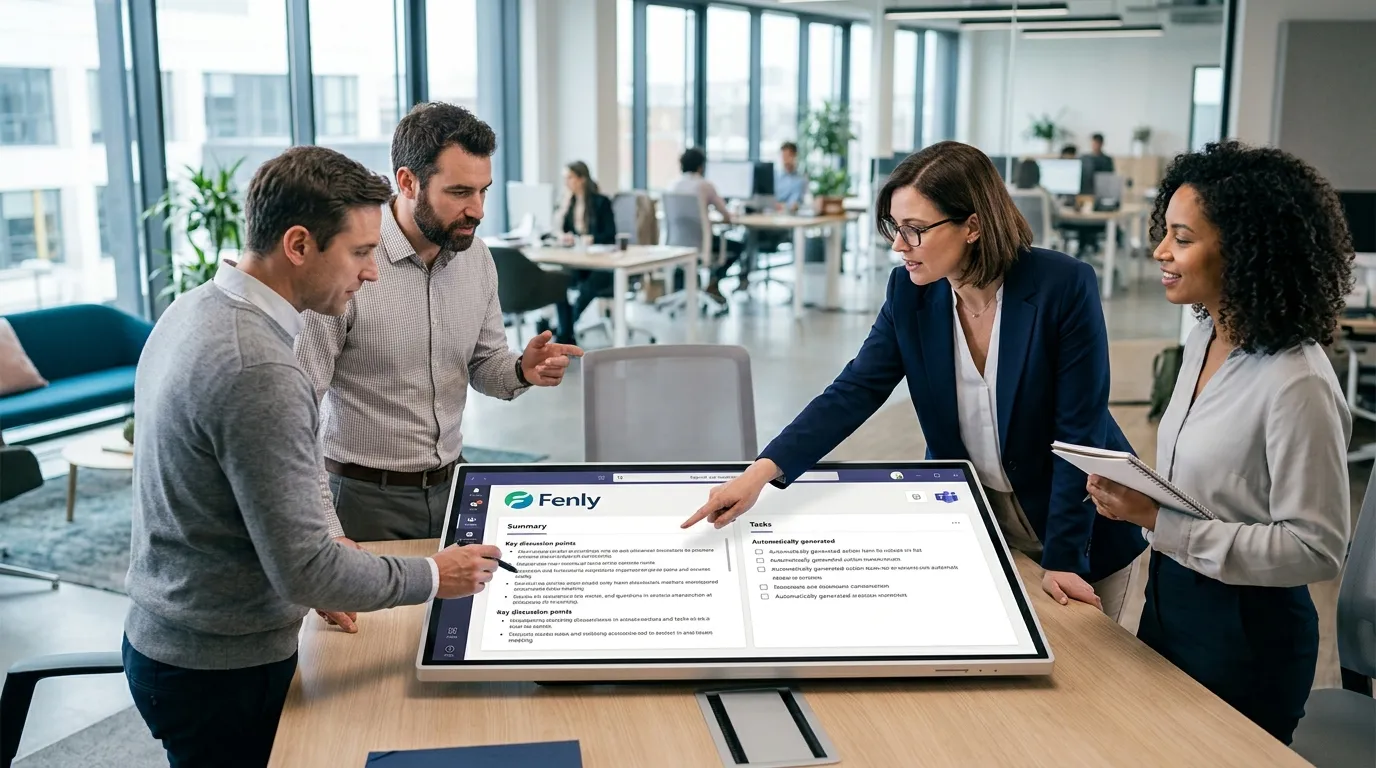
How to Turn Video into Text Automatically

Modern business operations demand ever more speed and precision when it comes to managing information. Spending hours re-watching recordings just to recover one key decision is a thing of the past. Today, learning how to turn video into text automatically is the ideal way to save time and boost productivity for tech teams, managers, and sales departments alike.
By converting audiovisual records into written documents, you eliminate manual work and make sure every decision is permanently captured. In this guide, you'll learn how cutting-edge AI technologies perform this conversion and how you can put this capability to work to generate clear, actionable deliverables for your day-to-day.
Table of Contents
- How AI automatically turns video into text
- Transcription technologies: Speech recognition vs. Natural language processing
- The impact of digital meeting minutes and task extraction on daily productivity
- How Fenly streamlines your routine with automated summaries and meeting recording
- Conclusion
- Frequently Asked Questions
How AI automatically turns video into text
"Digitizing communication workflows and automating office work can save professionals up to 30% of their time, freeing them up to focus on higher-value tasks." — McKinsey Global Institute, 2023
Technology has completely redefined how we handle audiovisual records in the workplace. Automating this conversion no longer relies on slow, manual transcription — instead, it's powered by robust algorithms that interpret human speech with remarkable accuracy.
This progress rests on core computer science principles that turn sound waves into structured text data. Three fundamental technologies make this shift efficient and practical for everyday business use:
- Speech recognition (ASR - Automatic Speech Recognition): The engine that decodes audio signals and maps them to phonemes, identifying spoken words regardless of accent or background noise.
- Natural language processing (NLP): The technology responsible for understanding sentence context, applying grammar rules, and resolving ambiguity so the generated text reads logically.
- Deep learning models: Neural networks trained on massive volumes of conversational data to keep the word error rate (WER) as low as possible in the final output.
By combining these capabilities, organizations can generate digital meeting minutes within seconds of a video call ending. This automation cuts out repetitive work and ensures no important decision slips through the cracks. With Fenly's AI, this workflow is optimized end to end, capturing meeting data and feeding it directly into your daily tasks through a smart AI meeting notetaker, so you can focus on strategic execution.

Transcription technologies: Speech recognition vs. Natural language processing
Streamlining today's workflows means converting audio into written records with cutting-edge technology. Two core scientific disciplines drive this process, efficiently generating text documents from audiovisual media.
"Meeting overload and fragmented digital communication cut worker productivity by as much as 40% over the course of the workday." — American Psychological Association (APA), 2023
With that in mind, here are the standout technologies in this space:
- Speech recognition: Technology focused on converting acoustic phonemes into raw alphabetic characters.
- Natural language processing: A branch of computer science that analyzes context to interpret the meaning and intent behind transcribed words.
- Digital meeting minutes: The final structured document that results from combining these two technologies to capture strategic decisions.
As a result, while basic tools simply capture phonetic audio, advanced platforms use AI to grasp the real meaning behind professional conversations and centralize that knowledge in a digital second brain.
| Comparison Point | Traditional Transcription Methods | Fenly Platform |
|---|---|---|
| Natural language processing accuracy | Low. Focuses only on literal phoneme conversion. | High. Understands technical jargon and corrects business terminology. |
| Automated task extraction capability | None. Requires manual review afterward. | Automatic. Identifies action items and owners directly in the text. |
| Integration with email and chat ecosystems | None, or limited to TXT file exports. | Full. Natively integrates with email, Teams, and Slack. |
| Actionable executive summary generation | None. Produces only large blocks of running text. | Built-in. Delivers daily activity summaries and natural-language answers. |
| Ease of searching and navigating transcribed content | Limited to simple exact-keyword search. | Advanced. Semantic search and contact relationship mapping. |
Bringing together applied AI and audio transcription helps teams cut down on meeting overload, turning conversations into centralized, executable action plans.
The impact of digital meeting minutes and task extraction on daily productivity
"About 67% of employees say too many meetings keep them from fully focusing on their daily tasks." — Harvard Business Review, 2019
Modern business demands quickly turning discussions into practical action plans. Instead of spending hours reviewing lengthy recordings, companies now use technology to transcribe audio instantly. This cuts down on time spent on operational busywork and ensures no important decision gets lost during the day.
Creating digital meeting minutes, combined with task extraction systems, turns casual conversations into structured commitments. This workflow is powered by advanced technologies that organize business information logically:
- Natural language processing: Lets algorithms identify spoken commitments and turn them into specific action items with clear deadlines.
- Speech recognition: Ensures accurate transcription across multiple speakers, minimizing misinterpretation in the written record.
- Applied AI: Categorizes transcribed content and autonomously routes responsibilities directly to internal communication channels.
By adopting Fenly, professionals gain an ecosystem that automates this entire data pipeline. The platform records meetings and consolidates automated summaries directly into your daily workflow. This approach removes the stress of manual follow-up through an optimized AI daily planner, delivering quick insights and natural-language answers about the status of every task your team has defined.
How Fenly streamlines your routine with automated summaries and meeting recording
In today's business world, an overload of virtual meetings eats up valuable hours that should go toward getting projects done. AI is the ultimate answer to this bottleneck, letting users decode audio into written text quickly and accurately.
"Professionals lose an average of up to 31 hours a month to unproductive meetings, directly impacting their ability to focus on priority tasks." — Boston University, 2023
Fenly takes a strategic approach here, combining meeting recording with advanced speech recognition and natural language processing technologies. Rather than just producing a passive transcript, the platform analyzes the conversation to intelligently structure your daily workflow.
By automating these processes, you get practical benefits that directly boost your company's productivity metrics:
- Instant digital meeting minutes: Structured reports generated instantly, covering key discussion points, decisions made, and critical alignments.
- Smart task extraction: Automatically identifies action items and commitments mentioned in the conversation, organizing them with an AI task manager in an actionable way.
- Personalized daily summaries: Daily recaps of emails, chats, and recorded meetings, providing natural-language answers about the status of any task.
By centralizing content scattered across different communication channels, Fenly removes the need for tiresome manual note-taking and reduces the stress of information overload. This approach ensures no important directive gets lost between what was said and what needs to get done.
Conclusion
Automating business processes is no longer a nice-to-have — it's become essential for companies to survive and grow in a competitive market. The ability to record meetings, extract data, and organize tasks in seconds saves precious resources and eliminates the stress caused by excessive, scattered communication across chats and emails.
By centralizing knowledge and turning conversations into clear action plans, teams gain the focus needed to work on what really matters strategically. AI has become the driving force behind this daily operational transformation, redefining modern workplace productivity.
To boost your business's efficiency, Fenly offers the ideal technology to record and summarize meetings, connecting directly with Gmail, Outlook, Teams, and Slack. With features built for automated task extraction and natural-language answers, the platform helps you plan your day with intelligence and precision. Try Fenly's solutions and discover the fastest way to turn video into text productively.
Frequently Asked Questions
How does the technology to turn video into text work?
The process uses modern speech recognition algorithms to capture the sound waves from a recorded meeting and convert them into alphabetic characters. Natural language processing systems then step in to understand context, fix grammatical errors, and add punctuation, producing accurate, easy-to-read digital meeting minutes — all fully automated.
What's the difference between simple audio transcription and AI applied to communication?
While simple transcription just converts audio into text with no contextual analysis, applied AI goes much further. It can autonomously extract tasks, organize topics discussed, identify who's responsible for each action, and provide automated summaries of key decisions, structuring your workflow in a genuinely useful way.
How do AI solutions help with everyday productivity?
By automating the conversion of meetings and conversations into text, professionals skip the manual work of writing up meeting notes or sitting through long recordings. Smart platforms like Fenly connect with your business communication tools, offering activity summaries and enabling semantic search so you can quickly retrieve key information just by asking natural-language questions.